

Description
Download AR Drawing Sketch Paint – AR drawing, sketching app, painting app, drawing tool, art app, free drawing app, AR art, drawing for beginners, creative app, drawing inspiration, AR sketching
Overview
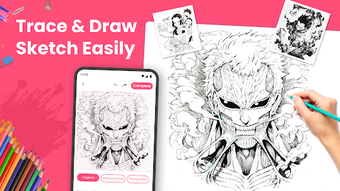
AR Drawing Sketch Paint is a lifestyle-oriented desktop application designed to merge augmented reality (AR) technology with creative expression. While the provided information indicates it is currently available for Android, this review focuses on the core functionality and user experience as described. The app aims to empower users—ranging from beginners to more experienced artists—to explore their artistic potential through interactive sketching and painting. It serves as a digital canvas enhanced by AR, enabling users to trace and create artwork with real-time visual guidance. The primary purpose is to lower the barrier to entry for digital art by offering intuitive tools and a vast library of over 2000 sketch images across 100+ categories, including anime, nature, popular characters, and festive themes. This makes it particularly useful for creative individuals seeking inspiration or families looking for engaging, screen-based activities. The app is free to download and use, with no reported in-app purchases or hidden costs. Its real-world applications include personal art projects, educational exercises, and casual entertainment. The developer, A1 Games, positions it as a tool that encourages artistic exploration and enjoyment without requiring prior skill.
Key Features & Capabilities
- Augmented Reality Integration: Utilizes AR technology to project sketch templates onto physical surfaces, allowing users to trace and draw with enhanced precision and spatial awareness.
- Extensive Image Library: Offers over 2000 pre-designed sketch images across 100+ categories, providing diverse inspiration for users of all interests and skill levels.
- Intuitive User Interface: Features a clean, accessible layout with quick search and filtering options to help users locate desired sketches efficiently.
- Color and Detail Customization: Allows users to choose between vibrant color palettes and detailed black-and-white sketches to suit their creative preferences.
- Real-Time Tracing Assistance: Leverages advanced AR algorithms to ensure accurate alignment and responsiveness during the sketching process, improving user confidence and output quality.
These capabilities make the app ideal for users who want to create detailed artwork without starting from a blank canvas. For example, someone interested in drawing anime characters can search for “anime” and immediately begin tracing a selected template. Similarly, a family might use the app during a weekend activity to draw festive scenes together. The combination of AR projection and curated content streamlines the creative workflow, turning passive browsing into active creation. While specific technical details about rendering speed or AR calibration are not provided, the app’s design suggests a focus on usability and immediate engagement.
User Interface, Workflow & Performance
The user interface is structured around simplicity and accessibility, with a layout designed to minimize cognitive load. Navigation appears to be linear and consistent, guiding users through steps such as selecting a category, browsing sketches, and initiating the AR tracing session. The workflow emphasizes speed and ease—users can search for a sketch in seconds and begin drawing with minimal setup. The app’s performance is expected to align with typical mobile AR applications, though exact resource usage details were not specified. General software behavior suggests smooth operation on devices meeting standard Android requirements. Stability and responsiveness are likely optimized for the target platform, though no third-party testing data is available. The developer did not provide information on CPU or RAM consumption, nor did they detail any background processes or battery impact. Users can expect a responsive interface during active use, but performance may vary depending on device hardware and environmental lighting conditions during AR sessions. Overall, the design prioritizes user experience over technical complexity, making it suitable for non-technical users and younger audiences.
Compatibility & System Requirements
AR Drawing Sketch Paint is designed for Android operating systems. The app’s version is listed as 1.5.5, and the installation size is 85.8 MB, indicating a lightweight footprint. The developer did not specify exact system requirements, such as minimum Android version, RAM, or processor type. Compatibility information is limited to the OS platform, with no mention of support for other systems like iOS, Windows, or Mac. The developer did not provide details on hardware dependencies, such as camera quality or ARCore support. As a result, users should verify compatibility with their specific Android device before installation. The app’s reliance on AR functionality suggests that devices with functional cameras and sufficient processing power are required for optimal performance. However, precise hardware benchmarks or minimum specifications were not disclosed. Platform compatibility information is partially provided, leaving some aspects of usability dependent on individual device capabilities.
Pros and Cons
Pros
- Free to download and use with no hidden costs or in-app purchases
- Extensive library of 2000+ sketch images across diverse categories
- Intuitive interface designed for users of all skill levels
- Augmented Reality integration enhances tracing accuracy and user engagement
- Quick search and filtering for easy access to desired content
Cons
- No information provided about system requirements or device compatibility beyond Android
- Performance and resource usage details were not disclosed
- Available only on Android, with no indication of cross-platform support
- Limited details on AR calibration or environmental lighting dependencies
- Desktop version not confirmed; current functionality is Android-based
FAQ Section
Is AR Drawing Sketch Paint available for Windows or Mac?
Currently, the app is designed for Android devices. There is no confirmed desktop version for Windows or Mac.
Is the app safe to download and use?
The app is free to download and use. While no security vulnerabilities were reported, users should download it from official sources to ensure authenticity.
Does the app require an internet connection?
Basic functionality, such as accessing downloaded sketches, may work offline. However, certain features like searching or updating the image library may require an internet connection.
Are there in-app purchases or ads?
The app is described as free with no hidden costs or in-app purchases. However, the developer did not specify the presence of advertisements.
How often are updates released?
The app’s latest version is 1.5.5, released on April 25, 2024. The update frequency is not specified.
Final Thoughts + CTA
AR Drawing Sketch Paint presents a compelling entry point for individuals seeking a fun, accessible way to explore digital art. Its integration of augmented reality with a vast library of pre-designed sketches makes it particularly well-suited for beginners and casual users who value inspiration and ease of use. The app’s free model and intuitive design remove common barriers to creativity, while its focus on diverse content ensures broad appeal. Although details about system requirements, performance, and cross-platform availability are limited, the core experience appears well-executed for its intended audience. Families, hobbyists, and aspiring artists can benefit from its engaging workflow and real-time AR assistance. While it may not replace professional-grade art software, it serves its niche effectively. For those looking to experiment with drawing and painting in a playful, guided environment, this app offers a promising solution. Download AR Drawing Sketch Paint now.
Guides & Tutorials for AR Drawing Sketch Paint
How to install AR Drawing Sketch Paint
- Click the Preview / Download button above.
- Once redirected, accept the terms and click Install.
- Wait for the AR Drawing Sketch Paint download to finish on your device.
How to use AR Drawing Sketch Paint
This software is primarily used for its core features described above. Open the app after installation to explore its capabilities.
User Reviews for AR Drawing Sketch Paint 0
No reviews found





